
Add your video
Drop in a podcast, livestream, gameplay session, or talking-head video — straight from Photos or Files.
No editing skills needed. Drop in a podcast, livestream, gameplay, or talking-head video, and Clipolette cuts captioned vertical clips for TikTok, Reels, and Shorts — in minutes, on your iPhone, iPad, or Mac.
How it works
There is no timeline to learn and nothing to set up. Clipolette does the heavy lifting; you keep the final say.
Drop in a podcast, livestream, gameplay session, or talking-head video — straight from Photos or Files.
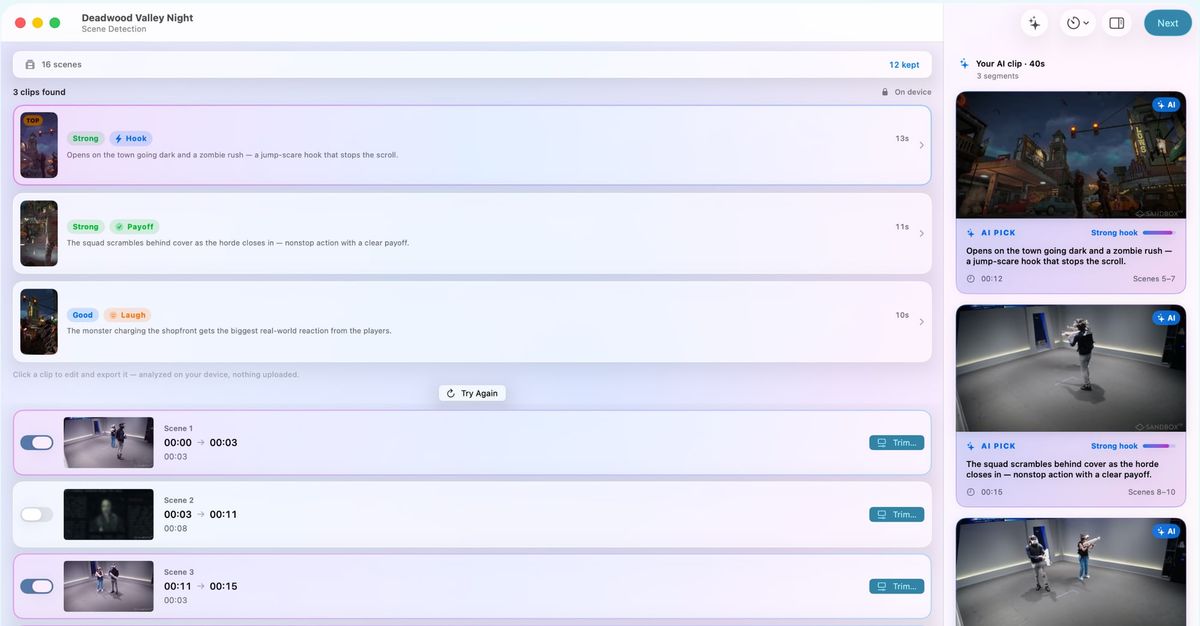
Pick a clip length — 15, 30, 60, or 90 seconds — and on-device AI scans for the most engaging moments, ranked best first. Every clip shows why it was picked.
Tap any clip to adjust it, then export. One long video becomes several vertical clips, ready for TikTok, Reels, and Shorts.
Free download — every editing tool included.
What Clipolette does
Built for creators who have an hour of great material every week and no time to cut it down by hand — convert, trim, crop, caption, translate, and export, all in one place.
On-device AI scans your video for the most engaging moments. It even listens for laughter, applause, cheers, and the moments your delivery gets loud and fired up — so emotional peaks and big reactions never slip by. Every clip comes with an honest strength rating.
After captions, on-device AI writes your clip’s packaging — a scroll-stopping on-screen hook, a title, and a ready-to-paste caption with hashtags. On iOS 26, iPadOS 26, and macOS 26.
Any landscape clip becomes crisp 9:16. Auto-Crop centers your speaker, Follow Subject pans to keep them in frame, Blurred Fill keeps your full shot, and Manual gives you the final say. See exactly how it’ll look before you export.
Auto-captions with word-by-word animation and TikTok-ready styles, translated into 19+ languages in a tap. Tighten Pauses cuts the dead air, Slow Motion adds ½× or ¼× drama, and Enhance upscales lower-res clips toward crisp 1080p.
Open several videos at once, each in its own window. Scene analysis and exports keep running while you work in other apps, and the Dock icon shows the progress.
Clip picking runs on Apple Intelligence, right on your device. Your videos never leave it: no uploads, no cloud rendering, no waiting on someone else’s server — and after a one-time language download, it all works offline.
Who it's for
If you're publishing podcasts, streams, or long videos, you already have the content — Clipolette turns it into the shorts you haven't had time to cut.
One episode becomes several clips. The AI listens for laughter and the moments your delivery gets fired up, so the best exchanges surface on their own.
Livestreams and gameplay VODs, clipped without scrubbing. No face in shot? Follow Subject tracks the action so the play stays centered in the vertical crop.
Long uploads become Shorts for discovery. Auto-Crop finds and centers your speaker, and animated captions keep every clip watchable on mute.
Follow Subject keeps the action in frame as it moves — pans, plates, and products stay centered even when nobody’s face is in the shot.
Guides
Walkthroughs for the jobs creators bring to Clipolette, on iPhone, iPad, and Mac.
Cut a long video into TikTok clips on your iPhone: on-device AI finds the moments, adds captions, frames them 9:16 and exports. No upload, no subscription.
Convert a podcast to shorts on Mac: on-device AI finds the best moments, captions them, and exports vertical clips. Free app, no uploads, no minute caps.
Add captions to video on iPhone with on-device AI: auto-transcribe, burn in subtitles, fix names inline, and save to Photos — no upload, no subscription.
Vertical video cropping AI on iOS: how auto-reframe tracks faces and action, why most apps crop badly, and where Clipolette runs the reframe on-device on iPhone.
Turn long video into TikTok, Reels, and Shorts on iPad. Clipolette runs the AI clip pipeline on M-series and A17 Pro iPads — no upload, no per-minute cap.
Turn a Twitch VOD into TikTok clips before it expires: on-device AI picks the highlights, captions them, and exports vertical 9:16 — free on Mac, iPad, iPhone.
Opus Clips alternative for iPad: Clipolette is a native Apple Silicon app that works offline and cuts long video into shorts — no upload, no queue, no cloud.
Offline video clip maker for Mac: Clipolette runs the full AI clip pipeline on Apple Silicon with no internet, no upload, no cloud. Flights, hotels, NDA workflow.
Apple-native
Auto-captions, translation, reframing, scene detection, trimming, and slow motion work on iOS 18, iPadOS 18, and macOS 15.4 and later. AI clip picking is powered by Apple Intelligence — it needs iOS 26, iPadOS 26, or macOS 26 on a device that supports it, and a video with sound — and Post Kit’s written text, saved projects, smoother slow motion, and Enhance need the 26 releases too. On iPhone and iPad, keep Clipolette open while it works; on Mac, analysis and exports keep running while you use other apps.
Pricing
Download free and use every editing tool at no cost. One optional one-time purchase removes the export watermark — pay once, keep it forever.
No subscription — $24.99 one-time to remove the watermark
Drop in your video and let Clipolette do the heavy lifting. Free to download — every editing tool included, no subscription.